Available on supported NVIDIA hardware. Individual DLSS features depend on the GPU generation.
Game info / hardware check
CONTROL Resonant System Requirements — PC and Console Specs
Compare the final Minimum and Recommended PC specifications, understand the resolution and frame-rate targets, and check PlayStation graphics modes.
Minimum PC target
Minimum PC requirements for 1080p at 30 FPS
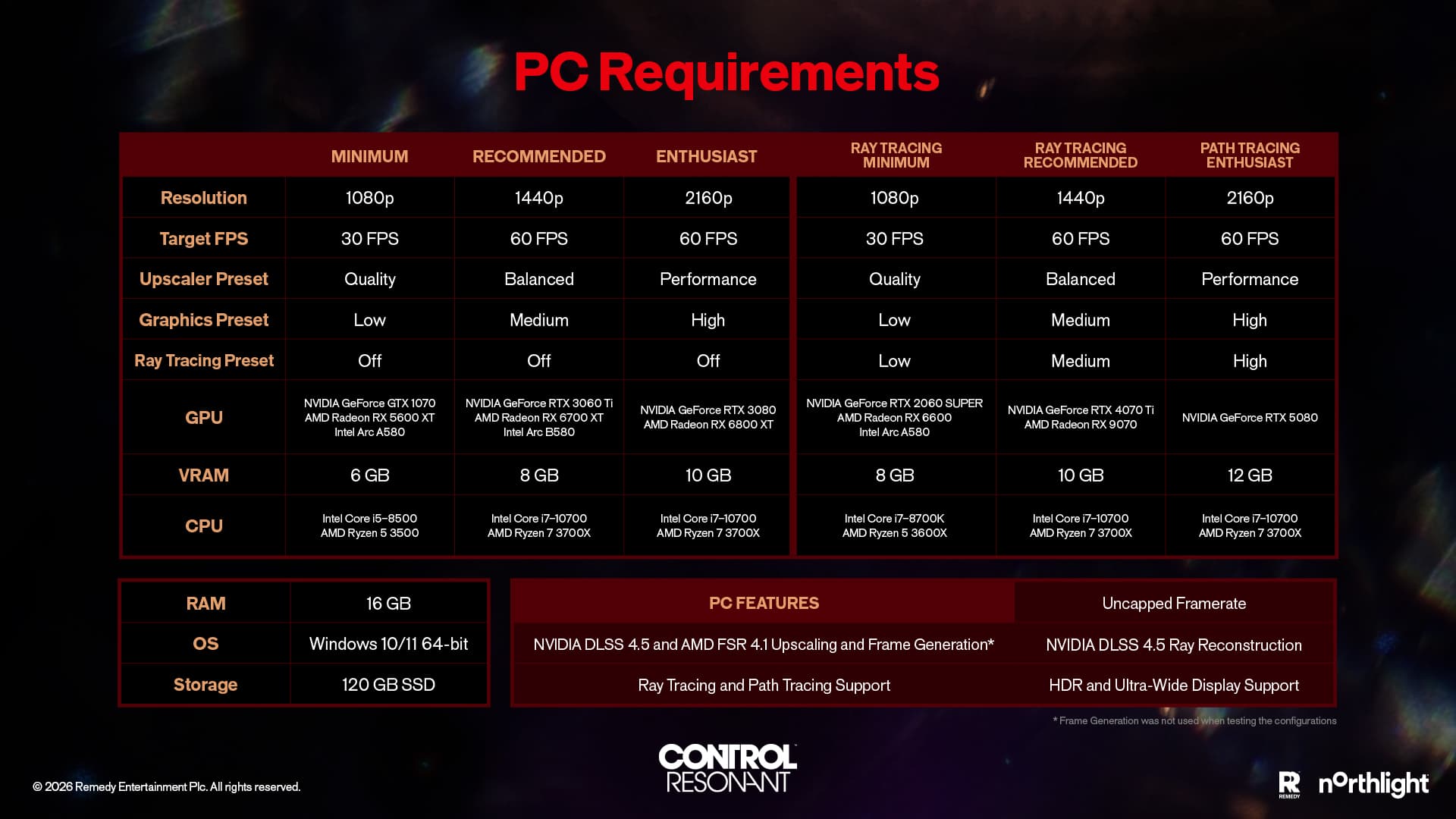
The published target uses Low settings, Quality upscaling and ray tracing off. It lists an Intel Core i5-8500 or Ryzen 5 3500 with a GTX 1070, RX 5600 XT or Intel Arc A580; the full comparison below also shows the Recommended 1440p target.
01 / Final PC chart
Minimum vs Recommended PC requirements
We read these as target configurations built around upscaling, not independent benchmarks or promises for every CPU, GPU, and driver combination.
| Component | Minimum | Recommended |
|---|---|---|
| Performance target | 1080p / 30fps | 1440p / 60fps |
| Graphics settings | Low, Quality upscaling; ray tracing off | Medium, Balanced upscaling; ray tracing off |
| Operating system | Windows 10 / 11 (64-bit) | Windows 10 / 11 (64-bit) |
| Processor | Intel i5-8500 / AMD Ryzen 5 3500 | Intel Core i7-10700 / AMD Ryzen 7 3700X |
| Graphics card | GTX 1070 / RX 5600 XT / Arc A580 | RTX 3060 Ti / RX 6700 XT / Arc B580 |
| Memory | 16 GB RAM | 16 GB RAM |
| Storage | 120 GB available / SSD required | 120 GB available / SSD required |
02 / Higher-resolution target
The published 4K non-RT GPU target
The separate Enthusiast example targets 2160p / 60fps on high, upscaling; ray tracing off. It lists an RTX 3080 or RX 6800 XT, but does not provide a matching CPU example. We would use it as a GPU target, not a complete PC build recommendation.
Interactive check
Open the system checker Compare your own setup with a published target
We keep the requirements table as the permanent reference. The checker compares your CPU, GPU, memory, storage, and performance target, then tells you which parts we can match and which remain unknown.
03 / Read the target correctly
Minimum does not mean native 1080p
The Minimum target explicitly uses Quality upscaling. Recommended uses Balanced upscaling. Your output resolution, internal render resolution and observed frame rate are not the same measurement.
04 / Before you install
Leave room beyond the listed 120GB
The requirement describes available game storage. Platform updates, shader caches, capture files and free space needed by the operating system can raise the practical space you should keep available.
05 / PC rendering features
Upscaling, ray tracing and path tracing
DLSS 4.5 and FSR 4.1 are announced; ray and path tracing have separate hardware targets. Features depend on GPU support and the selected mode.
Available on supported AMD hardware. Support for a technology name does not mean every listed GPU exposes every feature.
Separate hardware targets apply. The Minimum and Recommended rows above both describe ray tracing as disabled.
06 / Review-build reality check
What published PC testing adds to the official chart
We compared the launch-window PC tests with Remedy's chart, and the pattern is clear: demanding settings lean heavily on upscaling. One review rig still cannot promise a frame rate for your PC.
Minimum and Recommended already assume Quality or Balanced upscaling with ray tracing disabled. Compare your parts with those rows before looking at Ultra or path-traced results.
Review coverage reports that ray tracing, path tracing and the highest presets can require aggressive upscaling or frame generation even on powerful GPUs. Treat those as optional image features, not the expected default.
Resolution, preset, upscaler mode, frame generation, driver, CPU and game build all affect a benchmark. A GPU name without those conditions is not enough to predict performance.
We compare hardware classes with the published targets. We do not turn third-party review charts into a guessed FPS result.
07 / Console targets
PS5 and PS5 Pro graphics modes
Console modes are target combinations, not a PC-equivalent hardware requirement. Balanced mode on PS5 Pro requires a 120Hz display.
| Console | Mode | Target | Feature |
|---|---|---|---|
| PS5 | Performance | 1440p / 60fps | — |
| PS5 | Quality | 2160p / 30fps | — |
| PS5 Pro | Performance | 2160p / 60fps | PSSR |
| PS5 Pro | Quality | 2160p / 30fps | Ray tracing + PSSR |
| PS5 Pro | Balanced | 2160p / 40fps | Ray tracing + PSSR; 120Hz display |
PS5 also supports DualSense trigger feedback, compatible-headset 3D Audio and Activities for main-story progress. There is no equivalent Xbox performance-mode table here, so PC or PS5 targets should not be projected onto Xbox Series X|S.
08 / Limits of the chart
What PC requirements cannot confirm
We cannot use desktop component targets to predict handheld performance, console modes, or final DRM. For those answers, we need the platform announcement, storefront status, or a check of the release build.
Launch support is stated, but we would wait for final-build testing before assuming a preset, frame rate, or verification badge.
The game is confirmed for Series X|S, but no matching mode chart is available here. We would not reuse PS5 targets as Xbox claims.
No Denuvo announcement is recorded. The final storefront and executable information remain the relevant checks.
09 / Accessibility and difficulty
Assist Mode controls that change combat
Assist Mode can be adjusted during play, can make combat easier or harder, and does not lock trophies or achievements. These controls help distinguish hardware performance from an encounter setting.
| If the friction is… | Relevant controls | What they change |
|---|---|---|
| Too many attacks to read | Enemy Aggression, Enemy Projectile Speed | Encounter pressure and projectile pace |
| Dodge timing | Perfect Dodge Window | Timing tolerance; it can also be tightened |
| Damage or stagger | Incoming Damage, Outgoing Damage, Outgoing Falter | Survival, damage dealt and posture pressure |
| Power or melee positioning | Power Recovery Speed, Enhanced Melee Magnetizing | Ability recovery and close-range targeting |
| Story-first play | Immortality, One-Hit Kills, One-Hit Falters | Optional high-impact assistance |
10 / Language support
Audio and interface languages
- Full audio, interface and subtitles
- English, French, Italian, German, Spanish (Spain), Japanese, Portuguese (Brazil), Simplified Chinese
- Interface and subtitles
- Korean, Polish, Russian, Spanish (Latin America), Traditional Chinese, Turkish, Ukrainian
Quick answers
System requirements FAQ
How much RAM does CONTROL Resonant need?
The final Minimum and Recommended PC specifications both list 16 GB of RAM.
Does CONTROL Resonant require an SSD?
Yes. The final PC requirements specify an SSD and 120 GB of available storage.
Can a GTX 1070 run CONTROL Resonant?
A GeForce GTX 1070 appears in the Minimum configuration for a 1080p/30fps Low target using Quality upscaling with ray tracing disabled. That is a published target, not a guarantee for every system.
What GPU is recommended for CONTROL Resonant?
The Recommended configuration lists an RTX 3060 Ti, RX 6700 XT or Intel Arc B580 for a 1440p/60fps Medium target using Balanced upscaling with ray tracing disabled.
Is CONTROL Resonant supported on Steam Deck?
Remedy says Steam Deck is supported at launch. Final compatibility status and measured performance still require release-build testing.
Is Denuvo confirmed for CONTROL Resonant?
No Denuvo announcement has been published. The absence of a pre-release storefront notice does not prove that the final PC build is DRM-free.